Arch Linux. Opening AIChat — the one SQLite file behind Brave’s Leo sidebar — to see where the conversations, the pages it read, and the search results actually live.
Sometimes I use Brave’s Leo AI for nothing more than reading the page in front of me: highlight, ask Leo to summarize, close the sidebar, move on. It is the laziest kind of AI use — no account, no chat to save, no prompt engineering. That casualness is exactly what made me curious. If I never “save” anything, where does it go? Is my little pile of questions, pages, and answers sitting on Brave’s servers, or is it on my own disk? So I went looking, in my own profile, without cloning or installing anything.
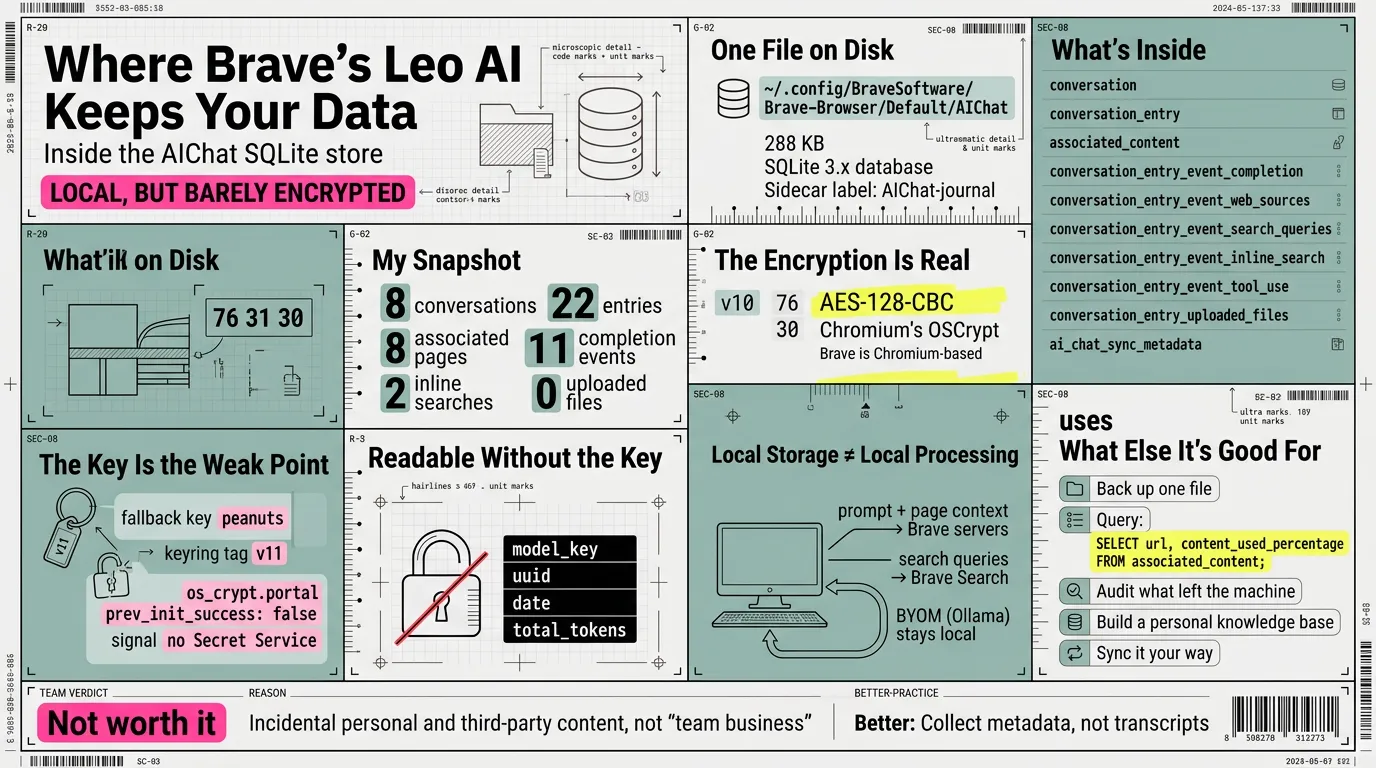
One file, on my own disk
The answer is my own disk, and it is almost anticlimactic. Everything Leo keeps about your conversations lives in a single SQLite database inside the browser profile:
~/.config/BraveSoftware/Brave-Browser/Default/AIChat
~/.config/BraveSoftware/Brave-Browser/Default/AIChat-journal
At the moment I looked, AIChat was a little over 300 KB, and file called it a “SQLite 3.x database.” The -journal file is the rollback journal: it sits at zero bytes while the browser is idle and grows only while a write is in flight. There is no leo/ folder, no per-conversation JSON, no synced document. It is one database.
That single fact is the whole article in miniature: your AI history is as local, and as portable, as any other browser file.
One exception worth knowing: the facts Leo is asked to remember across chats are not in this file at all. They are appended as plain strings to brave.ai_chat.user_memories in the profile’s Preferences — unencrypted JSON, no v10, no key required. That list is empty on my profile, but the setting ships on by default. Conversations live in the database; memories live in a preference.
What is actually in there
Brave had the file locked, so I opened a copy. The schema reads like a plain-English description of what that sidebar does:
| Table | What it holds |
|---|---|
conversation | each chat session — uuid, title, model, token counts |
conversation_entry | each turn — your prompt, the text you selected, the date, the model |
associated_content | the page you were reading — url, title, the last content Leo pulled, and content_used_percentage |
conversation_entry_event_completion | Leo’s answers, one row per completion event |
conversation_entry_event_search_queries | the search queries Leo issued |
conversation_entry_event_web_sources | the web sources behind a search, serialized |
conversation_entry_event_inline_search | inline search events |
conversation_entry_event_tool_use | tool calls |
conversation_entry_uploaded_files | files you dropped in, plus their extracted text |
ai_chat_sync_metadata | sync bookkeeping |
On my machine, when I looked: about a dozen conversations and a few dozen turns, a dozen associated pages, a handful of search and inline-search events, and zero uploaded files.
So “the search results” are not one thing. The queries Leo ran are in search_queries; the sources it found are in web_sources; and the page it summarized for me is in associated_content, right next to content_used_percentage — how much of the page the model actually read. That last column is quietly useful: it tells you whether the summary saw the whole page or only part of it. On my pages that column reads 100 across the board — none of them hit the limit; it drops below that only when Leo truncates a long page to fit the model’s context.
Local storage is not local processing
Before I get sentimental about privacy, one caveat: stored locally is not the same as processed locally. The history, the pages, and the answers sit on disk — but the prompt and the page text still travel to Brave’s servers, and on to the third-party model provider serving the model you picked (Mixtral, Anthropic’s Claude, Meta’s Llama), while the search queries go to Brave Search. Brave’s own page is explicit: the browser shares “your latest prompt, the context of your current conversation, and—when the use case requires it—the necessary context from the page you’re viewing.”
If that bothers you — and it should, if data security and privacy are the priority — Leo can run a local model instead, via BYOM (Bring Your Own Model): Ollama on your own machine, for example. That is the way to keep the entire conversation on your local disk with nothing sent outside — the prompt never leaves, the page context never leaves, and the answer is generated on your own hardware. The local database is the receipt of what you did; a local model is what makes the receipt the whole story.
The “encryption” is real — the protection may not be
Every message and page column — titles, prompts, selected text, completions, page URLs and content, search queries and sources — is a BLOB that begins with the bytes v10:
76 31 30 ... # "v10" + AES-128-CBC ciphertextThe structural columns are the exception: uuids, dates (Windows FILETIME — 100-nanosecond ticks, not Unix time), token counts, and — worth knowing — model_key are stored in cleartext, so the shape of your history and which model actually answered are readable without any key.
That v10 is Chromium’s OSCrypt — and Brave, being Chromium-based, inherits it. It is AES-128-CBC, the same mechanism that protects saved cookies and passwords. Normally the key comes from the system keyring (libsecret, GNOME Keyring, KWallet). But look at my machine:
Local State’sos_crypt.portalreportsprev_init_success: false.secret-toolreports no Secret Service to talk to.
When a keyring is unavailable, Chromium falls back to a hardcoded key: the v10 prefix is the fallback provider, whose key derives from the string peanuts, while v11 marks the keyring-backed provider. On a machine with no Secret Service like mine, the fallback is what you get — so the Leo database is “encrypted” in the sense that a text editor shows garbage, but not in the sense that it is safe: anyone who obtains a copy of the file can read it, with no login, no keyring, and no key. I decrypted my own store with that public key while writing this; titles, page URLs, and every search query Leo ran came back in clear text. It is obfuscation wearing the word encrypted.
The lesson is the same one I keep relearning: encrypted means nothing without knowing where the key lives. On a desktop with a working keyring, Leo’s history is protected against another OS user and against a stolen disk — though anything already running as you can still ask the keyring, or drive the browser, to decrypt it. On a machine like mine it is exposed to anyone who copies the file.
Two controls make most of this moot, and both are in the settings: temporary chats are never written to AIChat at all — the code refuses to persist them — and local chat storage can be switched off entirely. Worth knowing before you type anything into that sidebar.
What else this could be used for
This is the part that turned a curiosity into a small project. A local SQLite database is not just where data collects; it is a resource waiting for a use.
-
Back it up. One file to copy — but copy it cleanly:
sqlite3 AIChat ".backup leo.db"with the browser open, or just close the browser first, so you never catch a write mid-flight. On a setup like mine the copy is readable anywhere; on a keyring-backed profile the key stays in the keyring, so a reinstall without the old keyring leaves the backup as opaque bytes. Export the key too, or a backup is not a backup. -
Read your own attention. Because it is SQL, this is a query about what you asked AI to read, and how much of it the model digested — with one catch:
urlis itself av10blob, so raw SQL hands back ciphertext. The honest version queries the cleartext columns:SELECT content_type, content_used_percentage FROM associated_content;To get the URLs back you have to decrypt the column first — on a
peanutssetup, a few lines of Python with the same public key. -
Audit what left the machine. The queries and sources are recorded. If you care what you asked and where it went, the receipt is already written.
-
Build a personal knowledge base. Conversations plus the pages they touched are a reading journal — structured, timestamped, and queryable. Feed it to a local model, or reduce it into notes.
-
Sync it on your own terms. That
ai_chat_sync_metadatatable exists because Leo can sync; but a sync chain moves the data too. Since it is one database, you can sync it your way — an encrypted folder, a git-ignored directory — instead of only through Brave. -
Keep the loop offline. With a local model, the same database becomes a fully offline cycle: prompt, page, answer, all on disk, nothing out.
None of this needs a new feature from Brave. It needs the data to be local and structured — and it already is.
Would this work for a whole team? I don’t think so
Everything above is one user on one machine. The obvious next question is corporate: if a whole team uses Brave and Leo, is it worth collecting every conversation for commercial and business use — setting privacy aside on the assumption that all of it is team business anyway?
My answer, having looked at the file, is no: the assumption is the whole argument, and it does not hold. Leo stores the prompt and any selected text, the full page content it summarized in associated_content, and any uploaded files with their extracted text. People paste credentials, customer data, HR and legal matters, and personal questions into that sidebar. What you would be collecting is not “team business” — it is incidental personal and third-party content promoted into a company record, which then becomes your regulated data to retain, produce on request, and defend after a breach.
There is also a practical wall: the data is not centralized. It lives in each user’s own profile, and Brave does not retain or share it, so there is nothing to switch on. To collect it you would either sweep every machine (a management policy or MDM) or route Leo through a company-run BYOM gateway — a self-hosted OpenAI-compatible endpoint — and log there. The gateway is the only defensible collection point, and it is an engineering project, not a setting.
And even if you build it, the legal and cultural bill is real: employee monitoring needs disclosure and, in many places, a lawful basis plus a DPIA or a works-council agreement; collecting customer or partner content can breach the very NDAs that content arrived under; and the stored answers are model output — hallucinations — so treating them as authoritative business records is a mistake. Then there is the trust cost: people self-censor, or move to personal devices, and you end up seeing less, not more.
Where the value actually lives is the derived, minimized layer — not the raw transcripts: metadata and spend, a few voluntarily contributed prompts and answers, risk signals like leaked secrets or unsafe uploads, and reusable templates. Collect that, on disclosure, minimized, with a retention clock — not everyone’s AIChat.
So: locally, this is a personal record worth keeping. As a company-wide harvest — everything treated as team business, privacy waved away — I do not think it is worth it. The artifact is wrong, the assumption is wrong, and the cheapest part, storing it, is the least of the cost.
Closing
What started as a lazy question — where does this go? — ended where most of my terminal curiosity ends: a file I can open, a schema I can read, and a habit sharpened. Leo is not a black box to me anymore. It is one SQLite file, a handful of tables, and an “encryption” whose strength I can now measure. The sidebar gives me less than the word encrypted implies, and more than I expected — because the whole thing is just data, on my own disk.
Sources
- Brave, Brave Leo AI — features, local chat history, BYOM, and exactly what data is sent to Leo’s servers — https://brave.com/leo/
- Chromium,
components/os_crypt— the OSCrypt implementation that encrypts saved cookies, passwords, and this database — https://chromium.googlesource.com/chromium/src/+/refs/heads/main/components/os_crypt/ - Chromium,
posix_key_provider.cc— thev10fallback provider and its hardcodedpeanutskey — https://chromium.googlesource.com/chromium/src/+/refs/heads/main/components/os_crypt/async/browser/posix_key_provider.cc - Chromium,
freedesktop_secret_key_provider.cc— thev11keyring-backed provider — https://chromium.googlesource.com/chromium/src/+/refs/heads/main/components/os_crypt/async/browser/freedesktop_secret_key_provider.cc
btw, i use arch